



At the recent AOPA Aviation Summit in Ft. Worth, it seemed like every other exhibitor was hawking products related to the iPad. The Aviation eBrief newsletter the day before Summit began featured ads from no fewer than four nav software apps.
I had a chance to test-fly all of them during the course of Summit. I also had discussions related to features and bugs with a few of the reps. I may be a bit biased as I’ve been using ForeFlight on an iPad Mini for about a year. I voiced a couple of my squawks to the ForeFlight developers, as I had previously done via email:
-
•You can’t rename Imported Documents;
-
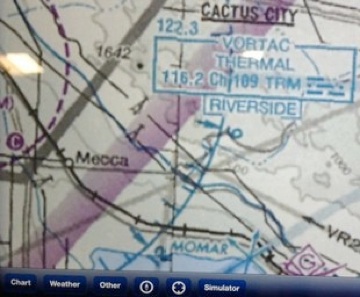
•They haven’t figured out a way to overlap the seams of charts when they’re stitched together (perfect example: you can’t read the Thermal VOR frequency box on the ForeFlight VFR sectional);
-
•There is no ‘profile’ view depicting terrain and airspace on a cross-country flight --- a feature I always liked in the AOPA FlyQ app.
Anyway, long-story, short…. I’m sticking with ForeFlight for now. To help you decide --- all of these apps offer a 30-day free trial --- I assembled a list at the end of this article of iPad and/or Android nav apps. Try ‘em all then decide for yourself!
BEWARE: PROPRIETARY HARDWARE
Here is one of the downsides to all these apps: They don’t play well together with different hardware. The Garmin Pilot app will work with only Garmin’s GDL-39 ADS-B receiver. ForeFlight will work with only the Stratus ADS-B. And if you buy the Clarity ADS-B receiver, it will not work with ForeFlight; you must use WingX or Bendix-King’s MyWingMan.
My recommendation is to pick the app you like best and then buy the hardware that supports that app. Hardware is a commodity; in-flight you will be interacting with the app, not the hardware.
WHY MOST PEOPLE WON’T SWITCH APPS
There is a major reason why most people will not switch between different apps year to year. First, there is a bit of a learning curve with any new app, and a comfort level with just sticking with what you’re already using. But here’s what I also discovered. These apps (and their associated data) are all HUGE. I’m talking 10+GB just for California data.
I attempted to load a free 6-month trial of Garmin’s Pilot app onto my iPad and it almost immediately told me “not enough space”. Done deal. I won’t be sampling any other apps if I have to first delete ForeFlight in order to install a second app. Unless you have a 64GB iPad, without a lot of videos or other apps on it, it’s unlikely you’ll have enough space to run two of these pilot nav apps simultaneously.
TRAFFIC ALERT
Several of these products offer linking to an ADS-B receiver (Stratus, Clarity, Garmin or Dual), which gives you in-flight weather (NEXRAD, METARS, charts, etc.), along with some traffic. I say ‘some’ because remember unless you are puking out an ADS-B Out signal (which you won’t be with ADS-B In going to your iPad), the FAA has decided to not give you full ADS-B traffic. Your government at work. Rather than do everything possible to ensure safety, they would rather bait you into upgrading your airplane’s avionics to provide ADS-B Out by withholding traffic from you until and unless you upgrade.
For this reason, ForeFlight has chosen to not offer ‘partial’ traffic like some of their competitors. At first, I was rather dismayed at this --- give me traffic! Some traffic is better than no traffic, right? But as I listened to their reasoning, I began to agree with them. Like we used to say in the market research business; bad data is not better than no data. They are concerned that you would have a false sense of security when receiving only partial traffic information, such as you get with an ADS-B In only signal, and have chosen to suppress ALL traffic information for that reason. It’s not a bug; it’s a feature.
PREDICTION FOR THE FUTURE
Aviation is a small industry. The number of active pilots using iPads or Android tablets in-flight is an even smaller subset of that universe. Some of these companies are very small; they literally have only a couple employees or are one-man shows. I foresee a couple of them folding their products into something else or just going away in the next couple years. WingX (Hilton Software) was actually one of the first to get into this iPad nav app business, but so far ForeFlight’s development cycles are leaving everyone in the dust.
I attended a seminar at AOPA Summit related to Advanced iPad Tips & Tricks. The moderator did a show of hands of apps being used. In my estimation, of the 400 or so attendees in the ballroom, about 60% were using ForeFlight, with the remaining hands split at about 10% each for WingX, MyWingMan and Garmin’ Pilot (he forgot to even poll about AOPA’s own FlyQ app; oops!)
Here is a list of the leading iPad nav app products; click on the name of any product to jump to their website. I have listed the VFR/IFR (full product) price of each, except in the case of the Jeppesen product, which is only available in a VFR version. Keep in mind, you will need the full version of these products to get all the features, such as ADS-B, moving map, AHRS, etc. I’ve also listed my top of mind positive or negative observation about each of the products.
ForeFlight $150
Document storage (POH’s, checklists, student lesson plans, FAA books, AC’s, etc.)
WingX Pro $100
Terrain profile, Zaon traffic integration
Garmin Pilot $75
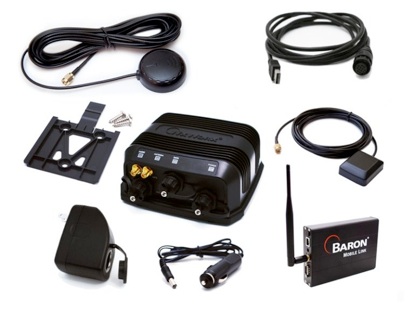
Split screen, some traffic info, XM-Weather with Baron Mobile link.
AOPA’s FlyQ $120
Web version integrates with iPad/iPhone app; split screen.
Smart route flight planning, Bluetooth audio alerts.
Jeppesen Mobile FliteDeck VFR $49
Non-standard charts (Class Bravo & Restricted is depicted in red), some info is not current/correct. Jittery pinch-zoom display.
© 2013 Garry Wing






