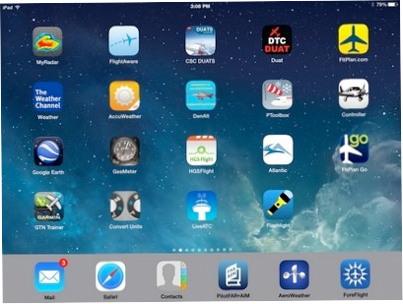


There are over 1.2-million apps in the Apple iTunes store, and over 1.3-million for ‘Droid devices in the Google store. While I haven’t gone through all of them, I have come up with a short list of some of my most-used aviation-related apps for the iPad / iPhone. Android users, check your local listings as to whether these are available for your device.
Navigation
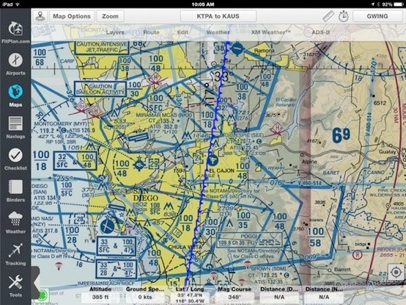
You’ll want to choose from one of the several  ‘moving map’ nav apps. I prefer ForeFlight, and you can review some of my favorite tips and tricks in this article.
You can find links to most of the other nav apps at the bottom of this article.

Current weather
You’ll want an app that allows you to quickly check current  METARs and TAFs, without having to launch your full nav app. AeroWeather does a nice job of this, allowing you to add and order your favorite airports. The Lite version is free for iOS devices and $4.99 for Android devices.
MyRadar allows you to zoom in and out on animated Nexrad  radar and cloud cover sequences as you pinch and zoom your way around convective activity. You can add Aviation Layers (IFR weather, TFR’s), recent earthquake activity and current temperatures. The Lite version (with ads and minimal features) is free for Apple devices.
The Weather Channel app is a good way to stay on top of general  ‘big picture’ weather trends. Another consumer-level weather app is provided by AccuWeather. Keep in mind, you need an FAA-approved weather briefing before flying (DUAT, DUATS or Lockheed-Martin), but if you want to see what’s happening in an area over the next several days,
  either of these free apps meets the need. Of course, the further out you look, the less accurate the forecasts tend to be, and Weather Channel tends to predict more cloudy and rainy days than does AccuWeather.
DUATS and DUAT apps. These probably aren’t winning any style or design awards;  some parts are downright clunky. But when you don’t have a computer handy to retrieve a weather briefing, they’ll get the job done. Remember, most of the nav apps let you
  link your DUAT or DUATS account and get your FAA-approved weather briefing from inside the app, but CSC-DUATS has developed their own app for the iPad, but not for the iPhone. (DTC-DUAT does have an iPhone app). All are free.
Rules & Regs
I quit using a printed FAR/AIM book a couple years ago. I like  everything about the PilotFar*Aim app except for one thing: there is no way to see new or changed content. The data gets updated every 30-days, while the printed books are already almost 6-months old when they get published each year. However, one of the first things I would do with each new edition is thumb through it looking for the changed material (either bold-italic typeface, lined-through or a vertical change line running down the margin made it easy to spot). For now, I guess I’ll just flip through a printed copy at Marv Golden’s or El Cajon Pilot Shop to view the changes and continue using the iPad/iPhone app for daily purposes. The bookmark feature alone makes it worth the $6.99 annual subscription price, plus you get access to all the regs; not just Parts 61, 91, 121, 135, etc. When was the last time you browsed through Part 23, the Airworthiness Standards for the general aviation airplanes we fly?
Flight Tracking
FlightAware is the go-to app (and website) to track airline and  general aviation flights in real time. I use it a lot with students to track them on their solo cross-country flights, kind of like my Mom did when I walked to the grocery store alone. Not only does it provide peace of mind (for me), but it’s helpful to see how well they’re holding altitude and heading (note that Mode C or ADS-B transponder pings reflect Pressure Altitude, not necessarily what their altimeter is indicating).
LiveATC - This is helpful for beginning students to monitor the  tower at Gillespie Field, but it’s also a great tool for “getting the feel” of traffic at unfamiliar airports. Before I take an Instrument student up to John Wayne, I recommend they listen for an hour or so on the LiveATC app (or the website) to get a feel for what I’m about to throw them into!
Utilities
DenAlt - This free app performs just one very simple task:  calculating density altitude. You type in field elevation, altimeter setting, temperature and dew point and it displays density altitude in both textual and graphic form. You can’t use it on your knowledge test, but I use it all the time at high elevation airports or on hot days.
PToolbox has a couple functions including weather and fuel
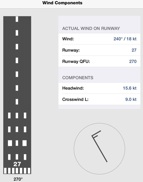 Ptoolbox helps visualize crosswinds calculations, but the only thing I use it for is to calculate crosswind component. Plug in the runway, wind direction and speed and it will calculate headwind and crosswind component and display the wind barb beside a runway image. Other useful functions in the app include Fuel Calculations and meter to flight level conversions.
PToolbox has a couple functions including weather and fuel
ConvertUnits - This is a Swiss army knife app that converts all  sorts of measurements. While not exclusively for aviation use, you can convert all kinds of time, temperature, speed, weight and energy measurements. How else would you know that 110,000 foot lbs/second is equal to 200-horsepower?
Google Earth can be used to ‘playback’ the flight track you record  in ForeFlight. Go home and judge your S-turns or ILS approach. While not as slick as the datapoints generated with Cloud Ahoy, it’s free...

Flashlight - Another app that’s not just for aviation, but as there is  no flash on the iPad (like on the iPhone), there is of course no flashlight. If you’re flying after sunset, which this time of year is any time after 5pm, you’ll want to have this free app on your iPad so you can find the pen that fell on the floor during your landing.
Fun Stuff
Controller - This is the app version of the magazine with all the  airplanes for sale. It’s easy to sort and filter (do you want all Cessna’s, all Cessna 172’s, or just 172-SP’s?), and fun to see what’s out there and what people are asking for their airplanes. Like the AutoTrader of airplanes.
G-Meter - I’ve only used this app a few times, but in aerobatics it’s  fun to see that all those G’s you thought you just pulled was really only 1.9G’s!
HGS Flight - Rockwell Collins came up with a fun app for your  iPad. It will take you a few times to gain any sort of control over the airplane (these ‘simulators’ never do fly like a real airplane, do they?); but once you do, it’s pretty cool when you land that Biz Jet or Airliner on the centerline.

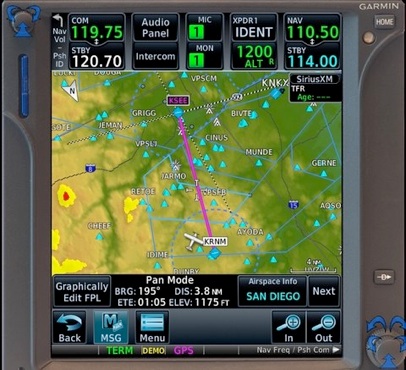
GTN Trainer - Garmin has a free computer simulator for the GTN  (650 & 750), like they’ve had for a while for the 430 and 530. But they also have an iPad app for the 750 (free for 30-days, then purchase for $24.99). I used this while I was having the GTN-750 installed in the Skylane to learn the system and was able to get everything I needed from the app well with the 30-day trial period.
If you have any other aviation apps you use on a regular basis, drop me a line and I’ll update this list from time to time.
© Garry Wing 2015